
The studio app
where your customers make videos.
A tour of /app, the part your customers use: the home screen, the guided flow with pitch mode, starting from a web page or a long text, videos, uploads, usage and notifications. Screens below are from a fresh install with no API keys set.
01Layout
The sidebar holds New video and the pages: Home, Videos, Templates, Client reviews, Renders, Brand kits, Uploads, Team, Plan and credits, Usage, Workspace, and Developers (owners only). At the bottom: notifications, the theme switch (system, light, dark), the workspace switcher with the credit balance and plan, and the account menu.
A person can belong to several workspaces; each workspace has its own videos, uploads, brand kits, team, plan and credits. What a person may do depends on their role in that workspace (Team roles).
02Home
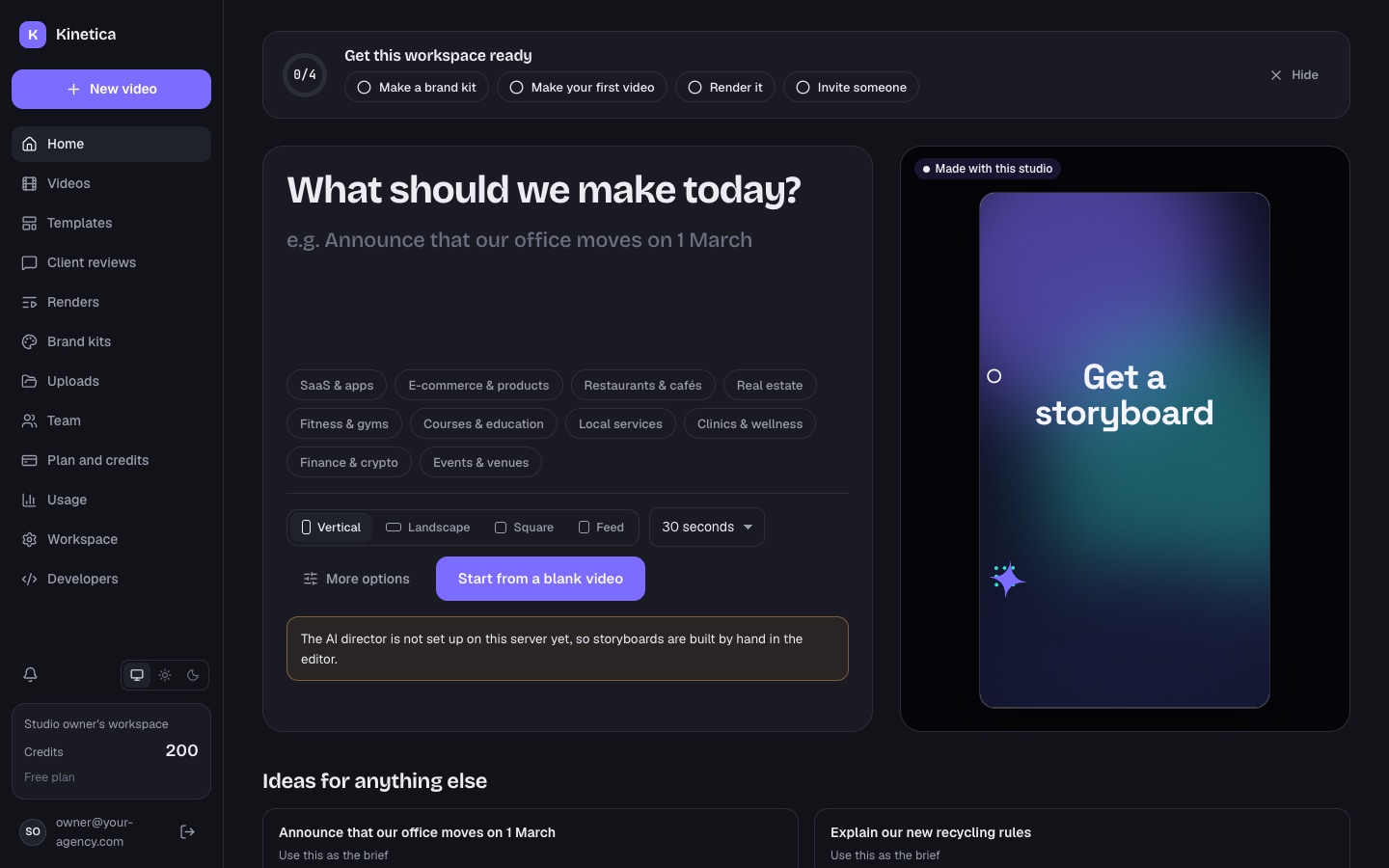
The fastest start: type what the video should say, pick a niche, a format (Vertical 9:16, Landscape 16:9, Square 1:1, Feed 4:5) and a length, and press Write storyboard. Claude writes the scenes, the words and the voiceover from what you typed. It only states facts you give it. The first draft takes about a minute. The storyboard price is shown under the box; the render price is shown before anything renders.
Without an Anthropic key the button becomes Start from a blank video and a note explains that storyboards are built by hand in the editor. The home page also has a "Get this workspace ready" checklist (make a brand kit, make your first video, render it, invite someone), idea cards for the chosen niche, recent videos and a template shortcut.
03The guided flow
New video opens five short steps. Claude turns them into a storyboard you can change scene by scene before anything renders (web/src/pages/NewVideo.tsx).
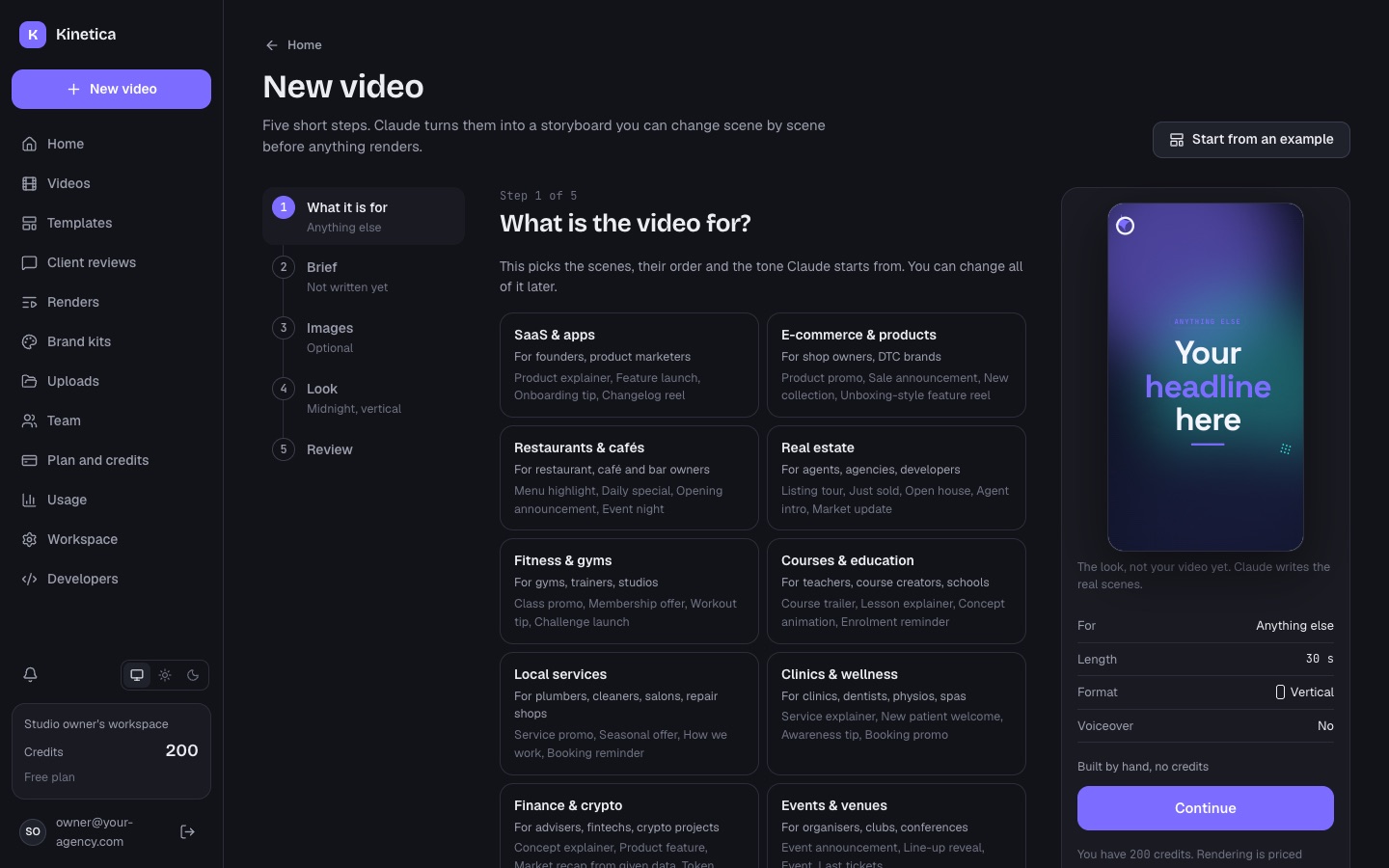
- What it is for Pick one of 17 niches (SaaS, e-commerce, restaurants, real estate, fitness, education, local services, clinics, finance, events, coaches, travel, automotive, beauty, nonprofits, hiring, anything else) and the kind of video. This picks the scenes, their order and the tone Claude starts from.
- Brief What the video should say, "The facts" (names, prices, dates; Claude never invents missing ones), target length (15 to 120 seconds, capped by the plan), language, voiceover on or off, caption style, tone of voice, call to action, website, and "How to pronounce names". Or start from a web page or a long text (below).
- Images Optional. Drop pictures (PNG, JPG, WebP, GIF or SVG, up to 15 MB each), pick from the workspace's uploads or search free stock photos, and say what is in each picture so Claude puts it in the right scene. Up to 20 pictures per video.
- Look Choose one of the looks and, optionally, a brand kit: your colours, font and logo on top of the look, and the kit's tone and call to action go into the brief.
- Review Check the summary, pick the model tier (Fast, Balanced, Smart, each with its credit price) and press Write storyboard. If writing fails, the credits come back.
A live preview on the right shows the chosen look and format ("The look, not your video yet"). Silent loop for screens makes a video for a TV in a shop window or a menu board: no sound, every scene reads on its own, and the end leads back to the start.
Start from an example (top right) opens finished example storyboards in the chosen format and look. You change the words; no AI credits. Start blank builds the scenes by hand.
04Pitch mode: angles first
On the Review step, Suggest angles asks Claude for 3 to 5 different ways to tell the story, each with an idea, a hook line and an outline (one beat per line). It costs the pitch price (1 credit by default) and uses the Fast tier's model.
- Click a card to pick it; click it again to drop it. You can edit the picked angle before the storyboard is written from it.
- No angle picked: Claude chooses the approach itself.
- If you change the brief after the angles were written, the flow says so: suggest new ones, or keep one and edit it.
05Start from a web page or a long text
On the Brief step (web/src/pages/NewVideoImport.tsx):
- From a website: paste the address of your own page (a product, a menu, a listing, an event). The studio reads its words and offers its pictures (only pictures hosted on the same site). With the AI director set up, "Let Claude write the brief" fills the brief and the facts from the page; otherwise "Use the page's words".
- From a long text: paste a text and Claude writes the brief from it (charged at the AI edit price). Check the facts before you continue: Claude uses them as written.
Nothing is posted anywhere; the studio only reads the page.
06Videos
Every storyboard in the workspace, with search by name, filters by status, format and tag, folders ("Make folder", "Move to folder"), tags, and a menu per video: duplicate, save as template, send for review, delete. Status shows "Being written" while Claude writes and "Storyboard ready" when it can be rendered. Click a video to open it in the editor.
07Uploads
Pictures, logos, screenshots, video clips and music for your videos. Everything stays inside the workspace. Limits (src/server/routes/workspace.ts):
| Kind | Types | Up to |
|---|---|---|
| Images | PNG, JPG, WebP, GIF, SVG | 15 MB each |
| Music | MP3, M4A, WAV | 30 MB each |
| Video clips | MP4 (plays without sound in the video) | 200 MB each |
| All uploads of one workspace | 2 GB |
Add a note on what is in each file so Claude places it in the right scene. With a Pexels key, Free stock photos searches Pexels and adds photos with the photographer's credit.
08Usage, notifications and account
- Usage: credits spent (by action and per day), finished renders, minutes rendered, videos made and uploads, for a period. Refunds are already taken off.
- Notifications (bell icon): finished renders, client comments and accepted invites. With e-mail set up, people also get "your video is ready" e-mails.
- Account: name, password (at least 10 characters; changing it signs out other devices), Download my data (one JSON file with the account, workspaces, videos, renders, uploads, credit history and notifications; no passwords or keys), and Delete account.
- Workspace: rename it (owners), copy its ID for support requests, and, when you allow it, set the workspace's own Anthropic key (Who pays for what).