
API and webhooks
make videos from other software.
Workspaces can create and render videos from their own software, Zapier or Make through a REST API at /api/v1, and get signed webhooks when something finishes. It is off until you turn it on.
01Turn it on
- Console Settings, Public API: turn "Public API and webhooks" on. "Requests per minute per API key" (default 60) limits each key.
- Plans Tick "REST API and webhooks" on every plan that should have it.
- Studio The workspace owner opens Developers and creates a key. The key (
msk_…) is shown once and stored only as a hash; revoke it there. A key acts for its workspace, on behalf of the person who created it (credits, history).
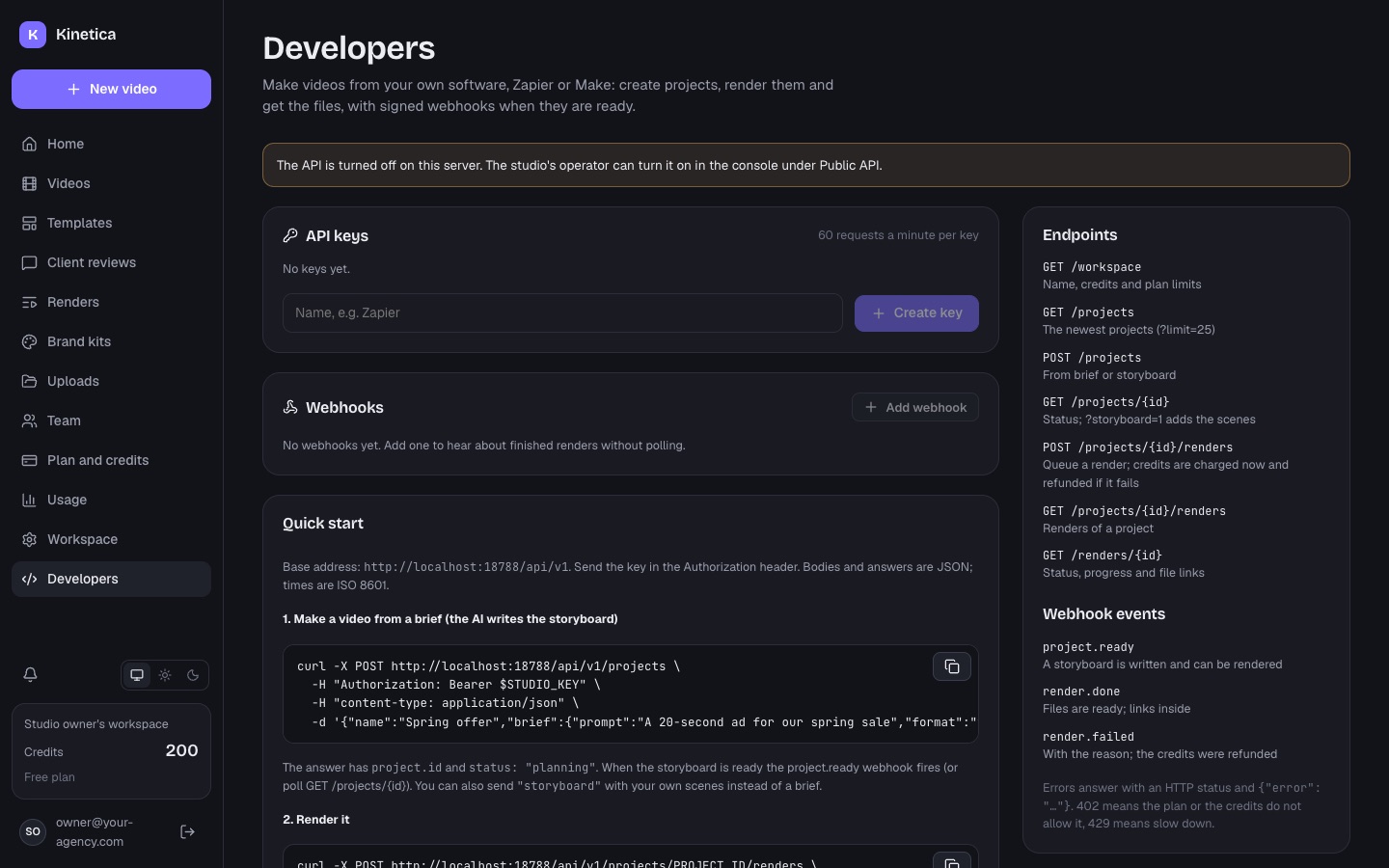
The Developers page shows the base URL, a quick start with curl examples, the endpoints, the webhook events and how to verify a webhook.
02Endpoints
Base URL: https://your-domain/api/v1. Send the key in every request as Authorization: Bearer msk_…. Bodies and answers are JSON; dates are ISO 8601 (src/server/routes/api-public.ts).
| Method and path | What it does |
|---|---|
GET /workspace | Name, credits and the plan's limits |
GET /projects?limit=25 | The workspace's videos, newest change first (limit 1-100) |
POST /projects | Create a video from brief (the AI writes the storyboard) or from storyboard (your own scenes) |
GET /projects/{id} | One video; add ?storyboard=1 to include its storyboard |
GET /projects/{id}/renders | Its last 30 renders |
POST /projects/{id}/renders | Queue a render (charges credits now, refunded if it fails) |
GET /renders/{id} | Status, progress and, when done, file links |
Create from a brief
Answers 202 with status planning; the storyboard costs the storyboard price in credits. When it is ready the project.ready webhook fires (or poll GET /projects/{id}).
curl -X POST https://your-domain/api/v1/projects \
  -H "Authorization: Bearer msk_…" -H "content-type: application/json" \
  -d '{"name":"Spring sale","brief":{"prompt":"A 20 second vertical ad for our spring sale on running shoes","format":"9:16","seconds":20,"language":"en-US","facts":{"discount":"30% off until 31 March"}}}'
Brief fields: prompt (required, 8+ characters), format (9:16, 16:9, 1:1, 4:5), seconds (6-600, capped by the plan), language, voice (true/false), theme, niche, captions, loop, facts (an object of exact facts).
Create from a storyboard (answers 201, status ready, no AI call): {"name": "…", "storyboard": { … }}.
Render
curl -X POST https://your-domain/api/v1/projects/prj_…/renders \
  -H "Authorization: Bearer msk_…" -H "content-type: application/json" \
  -d '{"formats":["16:9"],"review":true}'
Answers 202 with the render and the credit estimate. formats are extra aspect ratios next to the video's own one (the plan must allow several formats); review: false skips the AI check of the frames.
Get the files
A finished render lists its files, each with a url that downloads without a key for one hour, so Zapier, Make or an e-mail step can fetch it. Ask GET /renders/{id} again for fresh links.
03Errors
Errors are {"error": "what happened", "status": 4xx}.
| Status | Meaning |
|---|---|
| 401 | Wrong or revoked key |
| 402 | The plan or the credits do not allow it |
| 403 | The API is turned off on this server |
| 404 | Not found |
| 409 | Not ready yet |
| 422 | A field is wrong |
| 429 | Rate limit: wait a minute |
04Webhooks
On the Developers page the owner adds an https URL (public address, port 443; local and private addresses are refused) and picks events:
| Event | When |
|---|---|
project.ready | A storyboard from a brief is written and can be rendered |
render.done | A render finished; the data has the files with their links |
render.failed | A render failed, with the reason (its credits were refunded) |
Each delivery is a POST with content-type: application/json and this body:
{ "id": "evt_…", "type": "render.done", "created": "2026-11-09T10:00:00.000Z", "workspace": "ws_…", "data": { … } }Headers: x-studio-event (the event) and x-studio-signature: t=<unix seconds>,v1=<hex>, where v1 is the HMAC-SHA256 of "<t>.<raw body>" with the webhook's secret (whsec_…, shown once when you add it). Check it before you trust a delivery, and refuse timestamps older than 5 minutes:
import { createHmac, timingSafeEqual } from "node:crypto";

function verify(secret, rawBody, header) {
  const p = Object.fromEntries(header.split(",").map((x) => x.split("=")));
  if (Math.abs(Date.now() / 1000 - Number(p.t)) > 300) return false;
  const want = createHmac("sha256", secret).update(`${p.t}.${rawBody}`).digest("hex");
  return want.length === p.v1?.length && timingSafeEqual(Buffer.from(want), Buffer.from(p.v1));
}
Answer with any 2xx within 10 seconds. The Developers page has a "Test" button (sends a ping event) and the last 50 deliveries of each webhook with their result.