
Rendering
from storyboard to MP4, and everything next to it.
Render turns the saved video into files on your server: an MP4 per format, captions, a cover and optional extras. You see the price before anything renders, and a failed render gives its credits back.
01The Render dialog
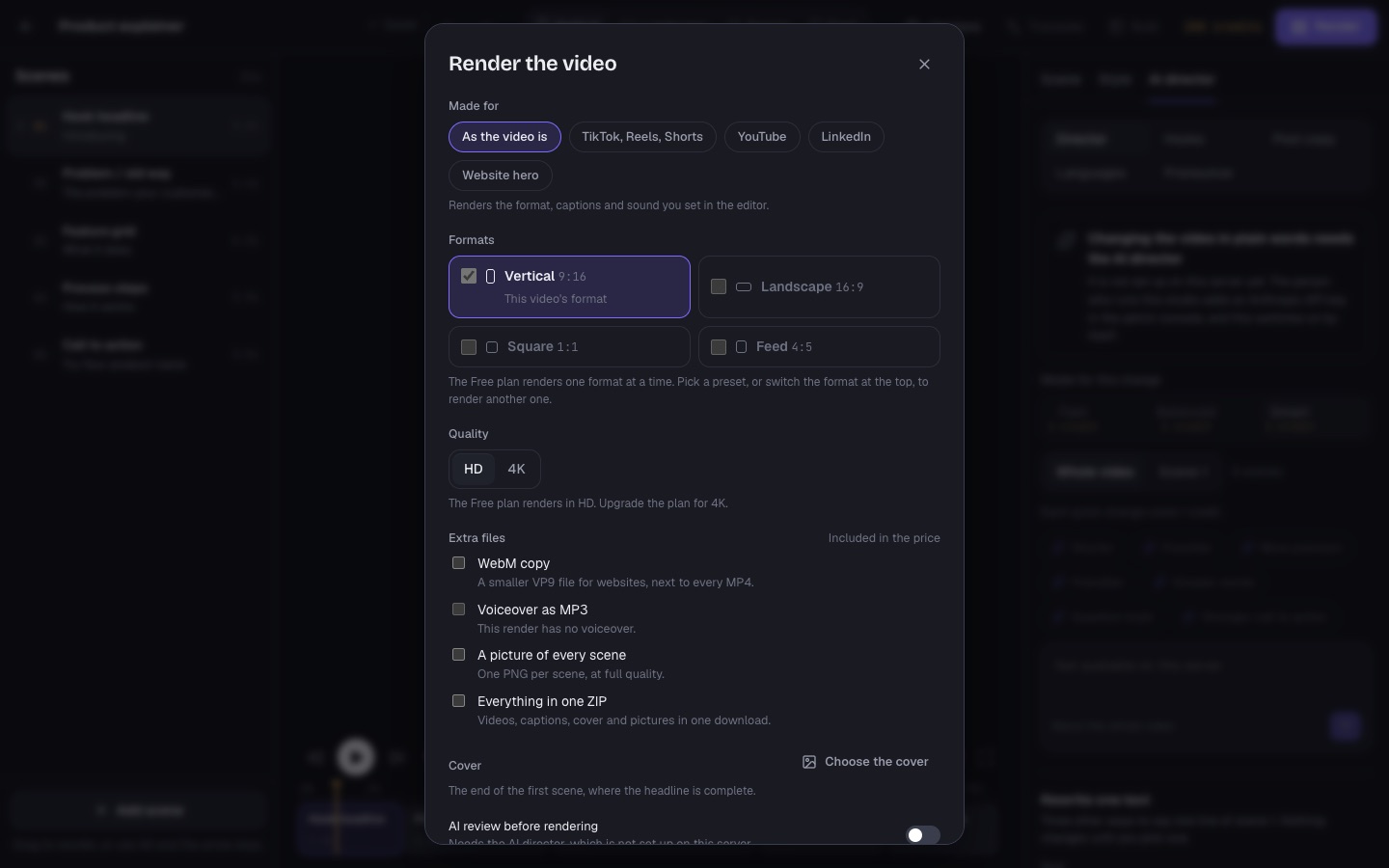
| Option | What it does |
|---|---|
| Made for | "As the video is" renders the format, captions and sound you set in the editor. Or a preset (below). |
| Formats | The video's own format, plus other aspect ratios from the same storyboard when the plan has "Export all formats at once". Each format is priced separately. |
| Quality | HD, or 4K (2160 pixels on the short side) when the plan has "4K export". 4K costs the 4K multiplier (3× by default) and takes about four times longer. The plan's resolution (720p or 1080p) applies to HD. |
| Extra files | Included in the price: WebM copy (a smaller VP9 file for websites), voiceover as MP3 (the narrator alone), a PNG picture of every scene, and everything in one ZIP. |
| Cover | Default: the end of the first scene, where the headline is complete. Or choose a scene and a moment, and an optional title written large at the bottom. |
| AI review before rendering | Claude checks the frames for clipped text and empty scenes first, and fixes them. Skipped when nothing changed since the last reviewed render. Needs the Anthropic key. |
The dialog shows the total price and your balance. Rendering starts at once; you can keep editing, and the render uses the version you just saved. Earlier renders of the video are listed at the bottom.
02Presets
From RENDER_PRESETS in packages/render/src/exports.ts. A preset changes only this render, never the saved video.
| Preset | Format | What it sets |
|---|---|---|
| TikTok, Reels, Shorts | 9:16 | Bold captions placed above the app buttons, inside the safe zone |
| YouTube | 16:9 | Widescreen with your captions as they are |
| 1:1 or 4:5 | Square or portrait for the feed | |
| Website hero | 16:9 | Silent loop with no voice or captions, plus a WebM copy |
03How a render is priced
With the default credit prices (Credits): 1 credit per 10 seconds of video per format, plus 1 credit per 10 seconds of video when it has a voiceover, and the render part times 3 for 4K. Extra files are included. The dialog always shows the exact total before you confirm. Credits are charged when the render is queued and refunded if it fails.
04The Renders page
Renders in progress (with progress, "Waiting for a free renderer" when the queue is full) and finished renders, ready to watch, download and share. Each finished render offers:
- The MP4 of every format, and the extras you picked (WebM, MP3, PNG stills, ZIP).
- Captions as SRT and as VTT (for the web), a cover image (JPG), and an animated GIF preview when the operator keeps "Make a GIF preview of every video" on.
- Share link: a link anyone can open to watch and download the video, without an account. "Stop sharing" turns it off.
- Send for review: a client review link for this exact render (Client reviews).
- "What the review changed", when the AI review fixed something.
A failed render shows the reason and "Nothing was charged". When the operator sets "Delete render files after (days)", old files are removed and the page says so; render the video again to get new files.
05The render queue
Renders run on your server with Chrome and ffmpeg, in the order they were queued, with plan priority first. The operator decides how many run at the same time, how many per workspace (1 by default, so one customer cannot block the others), how many may wait per workspace (5), and how many Chrome pages one render uses (Settings, Rendering). The console's Render queue page can cancel a render (credits go back) or retry a failed one (free for the customer).