
The editor
every scene, every word, and the AI director.
Every video opens in the editor: scenes on the left, a live preview with a timeline in the middle, and three tabs on the right (Scene, Style, AI director). Nothing renders until you press Render, so editing is free.
01Layout
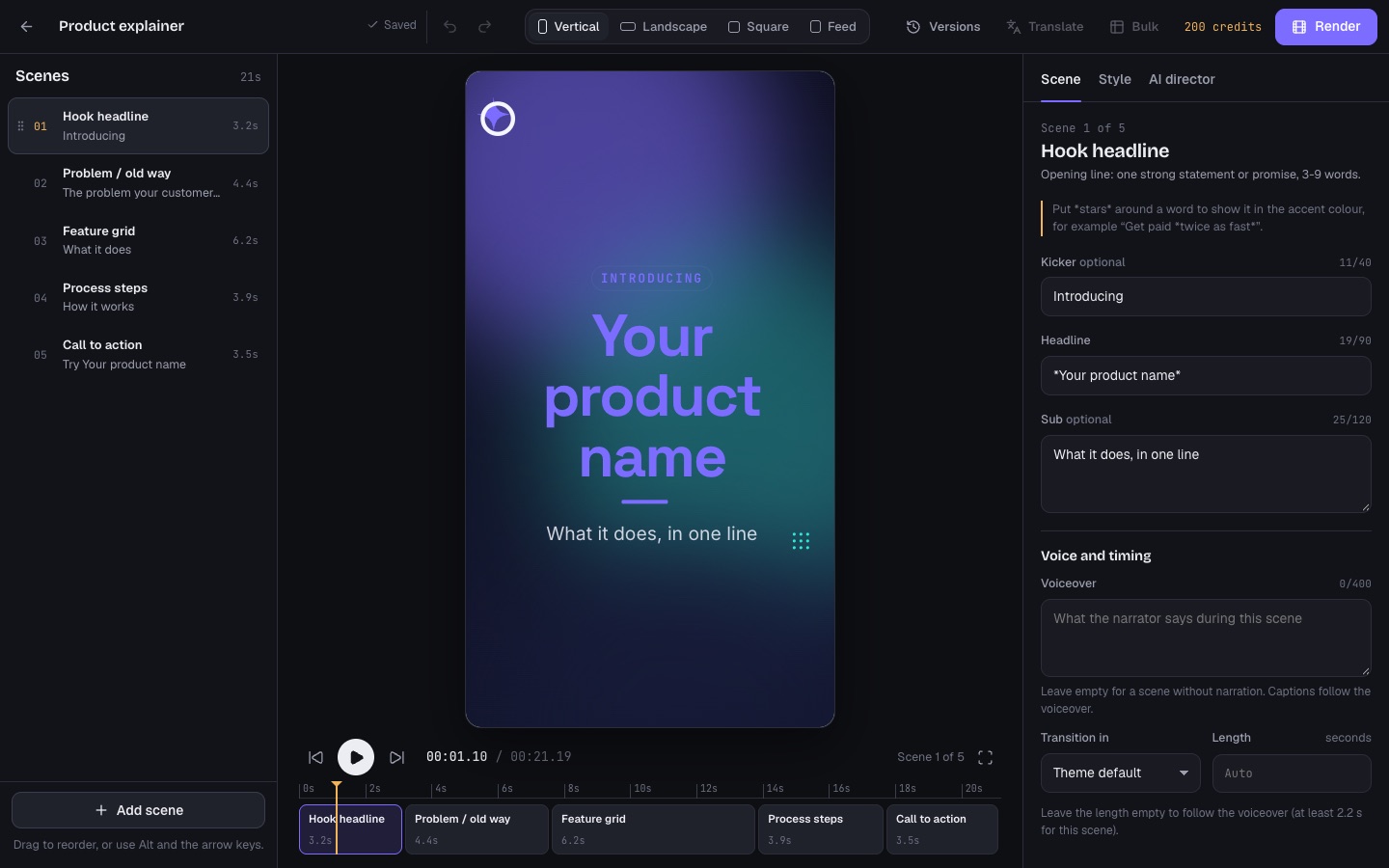
| Area | What it does |
|---|---|
| Top bar | Back to videos, the title, save state (Saved, Saving…, Unsaved changes), undo and redo (Ctrl+Z, Ctrl+Shift+Z), the preview format (Vertical, Landscape, Square, Feed), Versions, Translate, Bulk, the workspace's credits, and Render |
| Scenes | The list of scenes with their length. Drag to reorder or use Alt and the arrow keys; add, duplicate, delete and search scenes |
| Preview and timeline | Plays the video as it will render, with a timeline of scenes and a full-screen button |
| Scene tab | The selected scene's fields, its voiceover text, transition and length |
| Style tab | The whole video's look, colours, captions, voice and music |
| AI director tab | Changes in plain words and the AI content tools |
Changes save by themselves. If a change cannot be saved (for example a field is too long), the problem is shown under the preview and nothing new renders until it is fixed.
02Scenes
Kinetica has 42 animated scene types (among them hook headline, kinetic typography, big number, chart, before/after, device mockup, product hero, offer/price, menu board, property listing, testimonial deck, pricing plans, FAQ, countdown, video clip and call to action; all in packages/core/src/scenes*.ts). Each scene type has its own form in the Scene tab with character counters. Put *stars* around a word to show it in the accent colour.
- Voiceover: what the narrator says during the scene. Captions follow the voiceover. Leave it empty for a scene without narration.
- Length: leave it empty to follow the voiceover (each scene type has a minimum).
- Transition: the look's default or another one.
Pictures come from the workspace's uploads, a new upload, or free stock photos (with a Pexels key).
03Style
- Look: one of 18 looks (Midnight, Clean SaaS, Editorial Paper, Bold Pop, Luxe, Fresh, Sunset, Neon, Pastel Play, Corporate, Earth, Mono, Cloud Dancer, Fuchsia Pop, Poseidon, Acacia, Pinboard 2026, Brutalist). Try 3 looks shows the same storyboard in three looks that suit it. Free, nothing renders; Undo takes it back.
- Brand colours: accent and second accent, or the look's own colours.
- Captions: karaoke, bold, pop, box, clean, minimal, neon, typewriter or none, at the bottom or in the middle.
- Voice: the narrator for this video, from the voices the operator allows.
- Music: a track from the server's music library (by mood), your own upload, or no music, with a volume. Music ducks under the voice. Soft whooshes on scene changes are synthesised, so no third-party sound files are used (
packages/render/src/audio.ts). - Silent loop for screens: no voice, no captions and no fade at the ends, so it plays round and round without a seam.
Things a brand kit locks are shown locked here, and Claude keeps them (Brand kits and locks).
04The AI director tab
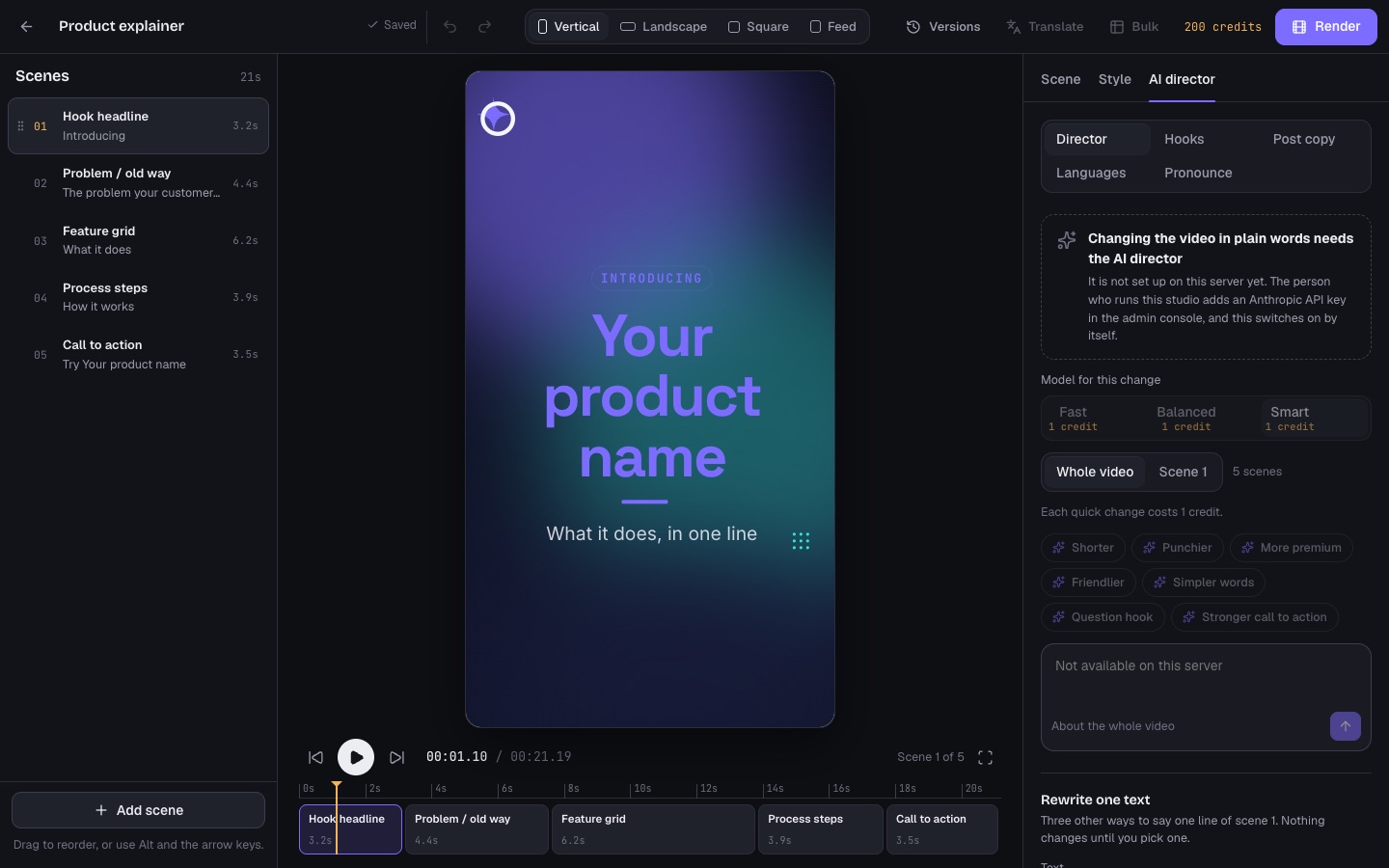
Five tools (web/src/editor/Chat.tsx). Without an Anthropic key every tool is still shown, switched off with a note; pronunciation works without AI.
| Tool | What it does | Price |
|---|---|---|
| Director | Tell it what to change in plain words ("the price is 19 €, say it in scene 3"), for the whole video or one scene. Quick changes: Shorter, Punchier, More premium, Friendlier, Simpler words, Question hook, Stronger call to action. It rewrites scenes, words and voiceover and keeps your facts; every change can be undone. | AI edit price × tier |
| Rewrite one text | Three other ways to say one line of the selected scene (or its voiceover). Nothing changes until you pick one. | AI edit price |
| Hooks | Three other openings for the video, and one click to make A/B copies with them, ready to render and post side by side. Copies are free; rendering each is priced as usual. | AI edit price |
| Post copy | A caption, title and hashtags for TikTok, Instagram, YouTube Shorts and LinkedIn, written from the video's words only. Each block copies with one click. | AI edit price |
| Languages | The same video in other languages: pick several, and each language becomes its own video. Every on-screen word and the voiceover are translated; names, prices, numbers and links stay as they are. About half a minute per language. | Translation price per language |
| Pronounce | How the narrator says names and brand words. Only the voice hears the spoken form; captions keep the written word. | Free |
"Model for this change" picks the tier (Fast, Balanced, Smart) with its credit price. Translation needs the plan's "AI translation" feature.
05Versions
A snapshot is kept every few minutes while you edit, and after every AI change. Versions lists them; restoring keeps everything, because the current state is saved as a new version first. Restoring is up to an editor of the workspace.
06Translate and Bulk in the top bar
- Translate makes a translated copy of this video in one language: on-screen text, voiceover and captions. This video stays as it is.
- Bulk turns this video into a template for a spreadsheet: write
{{column}}placeholders in any text, then paste or open a CSV (Bulk videos from a CSV).
Then press Render (Rendering and exports).